Need to batch export your entire scene in Maya as individual FBX! This simple python script is one way to go. Just copy-paste the script and you are good to go.
Let’s say you have a Maya scene with a lot of 3D objects. You can either export all those objects individually, by going to export selection for each one of them. Or you can batch export them with Game Exporter, which is the right way to do so.
Just in case, there is another way, through python script.
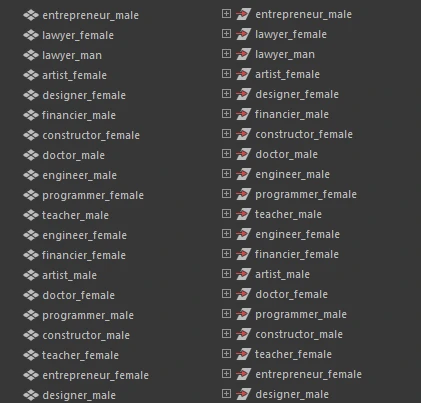
The script will export top-level objects from your scene, as individual FBX(s), and save them in a choosen folder. Since the script is written for top-level objects, your Maya scene need to have one of the structure of the image below, in order the script to work.
Here is the script:
import maya.cmds as cmds
import os

# Choose export folder
export_folder = cmds.fileDialog2(dialogStyle=2, fileMode=3, caption="Select Export Folder")

if not export_folder:
    cmds.warning("No folder selected. Export cancelled.")
else:
    export_folder = export_folder[0]

    # Get all top-level objects in the scene
    top_nodes = cmds.ls(assemblies=True)

    for obj in top_nodes:
        # Skip default cameras
        if obj in ['persp', 'top', 'front', 'side']:
            continue

        # Select object
        cmds.select(obj, replace=True)

        # Create file path
        file_path = os.path.join(export_folder, obj + ".fbx")

        # Export using current FBX settings
        cmds.file(
            file_path,
            force=True,
            options="v=0;",
            type="FBX export",
            pr=True,
            es=True
        )

        print("Exported:", file_path)

    cmds.select(clear=True)

    print("Export complete.")
After you run the script, a popup windows appears to choose your location for saving. That’s it, enjoy it.