Convert a color space from sRGB to Raw mode in Maya automatically through this python script.
The goal of this script is to switch the color space for the bump/normal texture maps from sRGB to Raw mode. Giving you also the option to do the same for the color texture map as well, in case you need it. Although, most of the times, you want the color texture map to be in sRGB mode.
What’s the Color Space Issue in Maya:
The issue occur when you re-import an already exported FBX into Maya. The color space for bump/normal maps has been converted to sRGB color space, assumed your original color space in Maya scene was in Raw mode.
It doesn’t matter what color space you have in Maya scene for your texture maps before you export as FBX. After you export as FBX, all your texture maps will be converted in sRGB color space mode.
Note: You can still use the script in Maya file as well. You don’t need to use it only in FBX format.
So in order to make those bump/normal textures files to look correct again, in the re-imported FBX in Maya, you have to switch, each one of those texture files to have Raw mode as color space. If they are a few, let’s say 5-10, it will take you about 20 seconds.
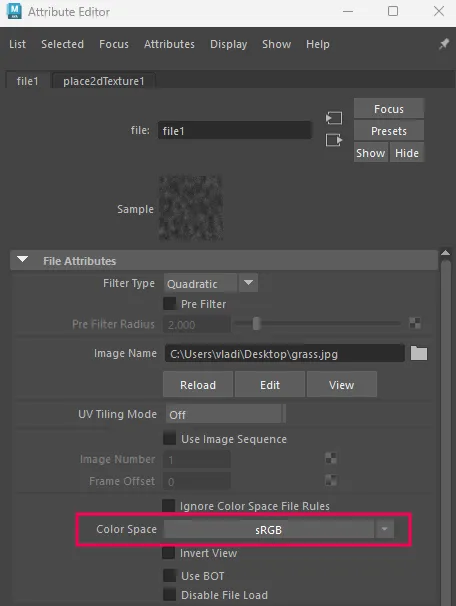
But what if you have let’s say 30-100 bump/normal maps in your re-imported FBX!. That’s where this python script is going to save the day. And make the whole process of switching all those texture files automatically for you.
Python script: Texture color spaces switch from sRGB to Raw mode (expand to see the code)
"""
Texture Color Space Fixer - Maya Tool
Fixes color space assignments for color and/or normal/bump map file nodes.
Supported shaders: Maya standard materials (phong, lambert, blinn)
and Arnold (aiStandardSurface). VRay and Redshift are not supported.
"""

import maya.cmds as cmds


# ─────────────────────────────────────────────────────────────────────────────
#  Detection helpers
# ─────────────────────────────────────────────────────────────────────────────

# Node types used as bump / normal intermediaries — primary detection method
_NORMAL_BUMP_NODE_TYPES = {
    "bump2d", "bump3d",
    "aiNormalMap",
    "RedshiftBumpMap", "RedshiftDisplacement",
    "VRayNormalMap", "VRayBumpMtl",
    "PxrNormalMap", "PxrBump",
}

# Exact destination attribute names (after the dot) that confirm bump/normal.
# We extract the part after the last dot from each plug string.
# Kept SPECIFIC — never use bare "normal" which matches "normalCamera" etc.
_NORMAL_BUMP_DEST_ATTRS = {
    "bumpValue",      # bump2d
    "bumpDepth",      # bump2d alternate
    "aiNormal",       # aiNormalMap
    "normalMap",      # various
    "bumpMap",        # VRay / Redshift
    "rsBumpInput",    # Redshift
    "vrayBump",       # VRay
    "normalInput",    # some custom shaders
}

# Color-space strings to set for each category
_COLOR_SPACE_NORMAL  = "Raw"
_COLOR_SPACE_COLOR   = "Raw"


def _downstream_nodes(file_node):
    """Yield all nodes reachable downstream from file_node (BFS)."""
    visited = set()
    queue   = [file_node]
    while queue:
        current = queue.pop()
        if current in visited:
            continue
        visited.add(current)
        for node in (cmds.listConnections(current, s=False, d=True) or []):
            if node not in visited:
                queue.append(node)
        yield current


def is_normal_or_bump_map(file_node):
    """
    Return True if file_node feeds a normal/bump network.

    Two-stage check:
      1. If any downstream node IS a known bump/normal node type, True.
      2. If the file node connects DIRECTLY into a known bump/normal
         destination attribute (exact match after the dot), True.

    We avoid substring matching on attribute names because Maya shading
    nodes all carry 'normalCamera' which would cause false positives.
    """
    # Walk downstream looking for bump/normal node types
    for node in _downstream_nodes(file_node):
        if node == file_node:
            continue
        if cmds.nodeType(node) in _NORMAL_BUMP_NODE_TYPES:
            return True

    # Check direct output connections from the file node for exact attr names
    out_plugs = cmds.listConnections(file_node, s=False, d=True, plugs=True) or []
    for plug in out_plugs:
        # plug format is "nodeName.attrName" — grab just the attr part
        attr = plug.split(".")[-1]
        if attr in _NORMAL_BUMP_DEST_ATTRS:
            return True

    return False


def is_color_map(file_node):
    """
    Return True if file_node connects into a recognised color/diffuse/albedo
    attribute downstream. Checked independently from normal/bump detection.
    """
    color_keywords = [
        "basecolor", "base_color", "diffusecolor", "diffuse",
        "albedo", "color", "kd_color", "emissivecolor",
    ]
    # Attributes to EXCLUDE — these look like "color" but aren't sRGB textures
    exclude_keywords = [
        "normal", "bump", "specular", "roughness", "metalness",
        "metallic", "opacity", "transmission", "displacement",
        "subsurface", "scatter", "weight",
    ]
    for node in _downstream_nodes(file_node):
        if node == file_node:
            continue
        in_plugs = cmds.listConnections(node, s=True, d=False, plugs=True) or []
        for plug in in_plugs:
            plug_lower = plug.lower()
            if any(ex in plug_lower for ex in exclude_keywords):
                continue
            if any(kw in plug_lower for kw in color_keywords):
                return True
    return False


# ─────────────────────────────────────────────────────────────────────────────
#  Core processor
# ─────────────────────────────────────────────────────────────────────────────

def process_file_nodes(fix_color=True, fix_normal=True):
    """
    Iterate all file nodes in the scene and fix color-space as requested.
    Returns (processed_count, skipped_count, error_count).
    """
    file_nodes = cmds.ls(type="file")
    total = len(file_nodes)

    if total == 0:
        cmds.warning("No file nodes found in the scene.")
        return 0, 0, 0

    processed = 0
    skipped   = 0
    errors    = 0

    cmds.progressWindow(
        title="Texture Color Space Fixer",
        progress=0,
        maxValue=total,
        status="Initialising…",
        isInterruptable=True,
    )

    for i, fn in enumerate(file_nodes):
        if cmds.progressWindow(query=True, isCancelled=True):
            break

        cmds.progressWindow(
            edit=True,
            progress=i + 1,
            status="Checking: {}  ({}/{})".format(fn, i + 1, total),
        )

        try:
            changed = False

            if fix_normal and is_normal_or_bump_map(fn):
                current = cmds.getAttr(fn + ".colorSpace")
                if current != _COLOR_SPACE_NORMAL:
                    cmds.setAttr(fn + ".colorSpace", _COLOR_SPACE_NORMAL, type="string")
                    print("[NormalFix] {} : {} → {}".format(fn, current, _COLOR_SPACE_NORMAL))
                    changed = True

            elif fix_color and is_color_map(fn):
                current = cmds.getAttr(fn + ".colorSpace")
                if current != _COLOR_SPACE_COLOR:
                    cmds.setAttr(fn + ".colorSpace", _COLOR_SPACE_COLOR, type="string")
                    print("[ColorFix]  {} : {} → {}".format(fn, current, _COLOR_SPACE_COLOR))
                    changed = True

            if changed:
                processed += 1
            else:
                skipped += 1

        except Exception as e:
            errors += 1
            cmds.warning("Error processing {}: {}".format(fn, str(e)))

    cmds.progressWindow(endProgress=True)
    return processed, skipped, errors


# ─────────────────────────────────────────────────────────────────────────────
#  UI
# ─────────────────────────────────────────────────────────────────────────────

WINDOW_NAME = "texColorSpaceFixerWin"
WINDOW_TITLE = "Texture Color Space Fixer"


def _run(*_):
    fix_color  = cmds.checkBox("chk_color",  query=True, value=True)
    fix_normal = cmds.checkBox("chk_normal", query=True, value=True)

    if not fix_color and not fix_normal:
        cmds.confirmDialog(
            title="Nothing selected",
            message="Please enable at least one map type.",
            button=["OK"],
        )
        return

    processed, skipped, errors = process_file_nodes(fix_color=fix_color, fix_normal=fix_normal)

    # Build result message
    lines = [
        "Color Space Fix Complete",
        "",
        "  Fixed   : {}".format(processed),
        "  Skipped : {}  (already correct / unrecognised)".format(skipped),
        "  Errors  : {}".format(errors),
    ]
    if fix_color:
        lines.append("")
        lines.append("  Color maps  → {}".format(_COLOR_SPACE_COLOR))
    if fix_normal:
        lines.append("  Normal/Bump → {}".format(_COLOR_SPACE_NORMAL))

    cmds.confirmDialog(
        title="Done",
        message="\n".join(lines),
        button=["OK"],
    )


def build_ui():
    # Close existing window
    if cmds.window(WINDOW_NAME, exists=True):
        cmds.deleteUI(WINDOW_NAME, window=True)

    win = cmds.window(
        WINDOW_NAME,
        title=WINDOW_TITLE,
        widthHeight=(340, 220),
        sizeable=False,
        menuBar=False,
    )

    cmds.columnLayout(adjustableColumn=True, rowSpacing=0)

    # ── Header bar ───────────────────────────────────────────────────────────
    cmds.separator(height=8, style="none")
    cmds.text(
        label=WINDOW_TITLE,
        font="boldLabelFont",
        height=22,
    )
    cmds.separator(height=6, style="none")
    cmds.separator(height=1, style="in")
    cmds.separator(height=8, style="none")

    # ── Description ──────────────────────────────────────────────────────────
    cmds.text(
        label="Select which map types to fix color space for.\n"
              "Supports Maya standard materials and Arnold.",
        align="center",
        wordWrap=True,
        height=36,
    )
    cmds.separator(height=10, style="none")

    # ── Checkboxes ───────────────────────────────────────────────────────────
    cmds.frameLayout(
        label="Map Types",
        collapsable=False,
        marginWidth=16,
        marginHeight=10,
    )

    cmds.rowColumnLayout(numberOfColumns=2, columnWidth=[(1, 150), (2, 150)])

    cmds.checkBox(
        "chk_color",
        label="  Color / Diffuse / Albedo",
        value=True,
        annotation="Set color maps to Raw",
    )
    cmds.text(label="→  {}".format(_COLOR_SPACE_COLOR), align="left")

    cmds.checkBox(
        "chk_normal",
        label="  Normal / Bump",
        value=True,
        annotation="Set normal/bump maps to Raw",
    )
    cmds.text(label="→  {}".format(_COLOR_SPACE_NORMAL), align="left")

    cmds.setParent("..")  # rowColumnLayout
    cmds.setParent("..")  # frameLayout

    cmds.separator(height=12, style="none")

    # ── Run button ───────────────────────────────────────────────────────────
    cmds.button(
        label="Fix Color Spaces",
        height=36,
        backgroundColor=(0.22, 0.55, 0.22),
        command=_run,
        annotation="Process all file nodes in the scene",
    )

    cmds.separator(height=10, style="none")
    cmds.separator(height=1, style="in")
    cmds.separator(height=6, style="none")

    cmds.text(
        label="Only nodes whose color space differs from\n"
              "the target value will be modified.",
        align="center",
        font="smallPlainLabelFont",
        height=28,
    )
    cmds.separator(height=8, style="none")

    cmds.showWindow(win)


# ─────────────────────────────────────────────────────────────────────────────
#  Entry point
# ─────────────────────────────────────────────────────────────────────────────

build_ui()
Copy and paste the above python script into the Script Editor in Maya and press ctrl + enter to run the script.
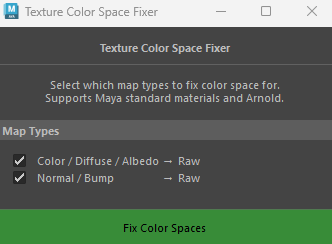
You have two options:
- Color
- Normal/Bump
Most of the case, you will only need to check the Normal/Bump option.
After you hit “Fix Color Spaces” all of your texture maps, either only Normals/Bump or Color maps too (depended on your choose), will be converted to Raw mode color space.
This script is currently is working perfectly for Maya standard and Arnold shaders. Since they are exported correctly when you export as an FBX.