

Fixing the green shader issue in Maya for multiple objects can be a tedious process. This Python script solves it with just one click. Seriously.
If you’re working in Maya with reference scenes and haven’t encountered this issue yet, consider yourself lucky. Really lucky.
It’s a headache, even when you know how to fix it. Especially when multiple objects are affected by the green shader issue.
Note: The python script was written with Claude AI assistant. I had the idea, and the problem that need to be solved, Claude AI made it happen.
What is a Green Shader Issue in Maya:
The issue typically appears in the rig scene when a mesh has a deformer applied (such as a skin cluster or blend shape), and the deformed shape node loses its connection to the shading group. This usually happens after assigning a new material to a mesh in the model scene and then using “Delete Unused Nodes” in the Hypershader.
If you’re interested in learning more about working with reference scenes in Maya, you can check Autodesk’s official documentation on the topic.
So what’s the issue!
The green shader issue occurs in the rig scene, when a mesh has a deformer applied (skin cluster, blend shape, etc.) and the deformed shape node loses its connection to the shading group. And that happens when you assign a new material to a mesh in your model scene, and after that you “Delete Unused Nodes” from the Hypershader. And then save your model scene.
When you return to your rig scene, you suddenly notice the green shader issue.
What does Maya is to misconnect the shape node of your geometry that has now the new material, instead of connected the deformed shape of that geometry to the shader node.
I’ve already written a blog post about fixing this issue manually, “How to Fix Green Shader Issue in Reference Scene in Maya.” You may want to read it for a deeper understanding of what breaks and how to fix it step by step.
But let’s jump straight to the Python script to simplify the entire process.
Python Script for the Green Shader in Maya:
This script comes with a simple UI that offers two options:
- Fix Selected Objects
- Fix All Green Shaders in Scene
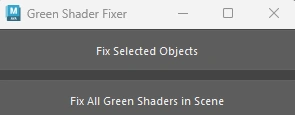
I won’t go into details, as both options are pretty self-explanatory.
Below is the python script (click expand):
Fix green shader in Maya (python script)
import maya.cmds as cmds
import re

# Fixes green (unassigned) shaders on deformed meshes in reference scenes
# by reconnecting ShapeDeformed nodes to their shading groups.

def get_deformed_shape(obj):
    children = cmds.listRelatives(obj, children=True, fullPath=True) or []
    pattern = re.compile(r'Shape\d*Deformed$', re.IGNORECASE)
    for c in children:
        short_name = c.split("|")[-1]
        if pattern.search(short_name):
            return c
    return None

def get_original_shapes(obj):
    shapes = cmds.listRelatives(obj, shapes=True, fullPath=True) or []
    result = []
    for s in shapes:
        short_name = s.split("|")[-1]
        if not re.search(r'Shape\d*Deformed$', short_name, re.IGNORECASE):
            result.append(s)
    return result

def get_shading_group(obj):
    for s in get_original_shapes(obj):
        sgs = cmds.listConnections(s, type="shadingEngine") or []
        if sgs:
            return sgs[0]
    return None

def disconnect_original_shapes_from_sg(original_shapes, sg_node):
    dag_indices = cmds.getAttr(f"{sg_node}.dagSetMembers", multiIndices=True) or []
    original_shapes_set = set(original_shapes)
    for i in dag_indices:
        sg_plug = f"{sg_node}.dagSetMembers[{i}]"
        sources = cmds.listConnections(sg_plug, plugs=True, source=True, destination=False) or []
        for src_plug in sources:
            src_node = src_plug.split(".")[0]
            full = cmds.ls(src_node, long=True)
            src_full = full[0] if full else src_node
            if src_full in original_shapes_set:
                try:
                    cmds.disconnectAttr(src_plug, sg_plug)
                    print(f"Disconnected: {src_plug} -> {sg_plug}")
                except Exception as e:
                    cmds.warning(f"Failed to disconnect {src_plug} from {sg_plug}: {e}")

def compact_dag_set_members(sg_node):
    """Collect all remaining connections, disconnect all, reconnect from [0] with no gaps."""
    dag_indices = cmds.getAttr(f"{sg_node}.dagSetMembers", multiIndices=True) or []
    connected = []
    for i in sorted(dag_indices):
        sg_plug = f"{sg_node}.dagSetMembers[{i}]"
        sources = cmds.listConnections(sg_plug, plugs=True, source=True, destination=False) or []
        if sources:
            connected.append(sources[0])
    # Disconnect all
    for i in sorted(dag_indices, reverse=True):
        sg_plug = f"{sg_node}.dagSetMembers[{i}]"
        sources = cmds.listConnections(sg_plug, plugs=True, source=True, destination=False) or []
        for src_plug in sources:
            try:
                cmds.disconnectAttr(src_plug, sg_plug)
            except Exception as e:
                cmds.warning(f"Could not disconnect {src_plug} from {sg_plug}: {e}")
    # Reconnect from 0
    for new_index, src_plug in enumerate(connected):
        sg_plug = f"{sg_node}.dagSetMembers[{new_index}]"
        try:
            cmds.connectAttr(src_plug, sg_plug, force=True)
        except Exception as e:
            cmds.warning(f"Could not reconnect {src_plug} to {sg_plug}: {e}")

def get_next_dag_index(sg_node):
    existing = cmds.getAttr(f"{sg_node}.dagSetMembers", multiIndices=True) or []
    return (max(existing) + 1) if existing else 0

def fix_green_shader_array(selection=None):
    if selection is None:
        selection = cmds.ls(long=True)
    if not selection:
        cmds.warning("No objects to fix.")
        return

    # --- PASS 1: gather all valid objects and their sg/deformed pairs ---
    jobs = []  # list of (obj, sg_node, shape_deformed_node, original_shapes)
    for obj in selection:
        if cmds.nodeType(obj) != "transform":
            continue
        shape_deformed_node = get_deformed_shape(obj)
        if not shape_deformed_node:
            continue
        sg_node = get_shading_group(obj)
        if not sg_node:
            cmds.warning(f"No shading group found for: {obj}")
            continue
        original_shapes = get_original_shapes(obj)
        jobs.append((obj, sg_node, shape_deformed_node, original_shapes))

    if not jobs:
        cmds.warning("No eligible objects found.")
        return

    # --- PASS 2: disconnect ALL original shapes from their SGs first ---
    for obj, sg_node, shape_deformed_node, original_shapes in jobs:
        disconnect_original_shapes_from_sg(original_shapes, sg_node)

    # --- PASS 3: compact each affected SG once (deduplicated by SG name) ---
    affected_sgs = list(dict.fromkeys(sg for _, sg, _, _ in jobs))  # unique, order-preserved
    for sg_node in affected_sgs:
        compact_dag_set_members(sg_node)

    # --- PASS 4: connect all deformed shapes sequentially ---
    fixed_count = 0
    for obj, sg_node, shape_deformed_node, original_shapes in jobs:
        next_index = get_next_dag_index(sg_node)
        try:
            cmds.connectAttr(
                f"{shape_deformed_node}.instObjGroups[0]",
                f"{sg_node}.dagSetMembers[{next_index}]",
                force=True
            )
            print(f"Fixed: {obj} -> {sg_node}[{next_index}]")
            fixed_count += 1
        except Exception as e:
            cmds.warning(f"Failed to connect {shape_deformed_node} to {sg_node}[{next_index}]: {e}")

    print(f"\nDone — Fixed: {fixed_count} | Skipped: {len(jobs) - fixed_count}")

def fix_selected_callback(*args):
    selection = cmds.ls(selection=True, long=True)
    if not selection:
        cmds.warning("Please select objects to fix.")
        return
    fix_green_shader_array(selection)

def fix_all_callback(*args):
    all_transforms = cmds.ls(type="transform", long=True)
    fix_green_shader_array(all_transforms)

def show_green_shader_ui():
    window_name = "GreenShaderFixerUI"
    if cmds.window(window_name, exists=True):
        cmds.deleteUI(window_name)
    cmds.window(window_name, title="Green Shader Fixer", widthHeight=(300, 100))
    cmds.columnLayout(adjustableColumn=True, rowSpacing=10)
    cmds.button(label="Fix Selected Objects", command=fix_selected_callback, height=40)
    cmds.button(label="Fix All Green Shaders in Scene", command=fix_all_callback, height=40)
    cmds.showWindow(window_name)

show_green_shader_ui()
You can use the above script for both senarios below:
- An object has a single material
- Multiply objects shares the same material
- Or a combination of both
It works for standard Maya materials, V-Ray, and Arnold materials.
If you find yourselft using the script often in your workflow, consider to put the script on a shelf in Maya.
I hope you find this script useful.
