
Webp image format is the new and modern way to export for web. And the reason for that is simple. Webp is much more smaller compared to other image formats such as JPEG and PNG. Which lead to faster page loading for your blog, site, etc.
It has been developen by Google, and privides superior compression for web image. Support both lossy, and lossless compression. It can also hold transparency and can be using for animation as well.
If you running a blog, site or anything on the web, you are probably conserned about the page speed, like we all do. And you already know that in every image we upload on the web, every kilobyte matter.
Until recently i wasn’t aware of this format, and after switched from JPEG image files to this format, I have noticed a dramatic increase of page loading speed.
Anoter similar by name format, this time for video is the WEBm video format, if you want to check it out.
Key Features of the Format:
If we use the Webp image format, we won’t worry much as we did when we uploaded other formats on the web.
The key feature of this format:
- smaller file size
- choose between lossy and lossless
- supports transparency
- supports animation
- faster web page loading
Your pages that have a lot images, will load much faster now on the web.
Export WEBp image format from Photoshop:
The process of export in webp format inside Photoshop is straightforward like all other image formats.
Open up your image in Photoshop.
Go to File – Save as. In the Save as type, choose the WebP format.
A new popup window with the options for this format appears.
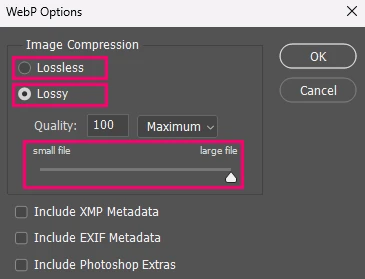
Note: We can lower a lot the slider for file size without significal image quality loss, and yet the file size will descrise dramaticaly.
For more technical information about Webp format, feel free to visit their official site for that matter.



17 Responses
Wow, I just switched to WebP too and it’s like a breath of fresh air! Page speeds have seriously improved. Definitely a game changer for my blog.
I’ve always been a JPEG kinda person, but this WebP thing is kinda cool. It’s great that it supports animations too—super handy for blogs!
You know, I didn’t realize how much file sizes actually mattered until I tried WebP. My site loads so much faster now—wish I’d done it sooner!
Honestly, the way you explained it makes it seem so easy to switch. I’m just a little nervous about losing image quality, ya know?
I love the fact that it supports transparency! That’s gonna save me so much hassle for graphic design stuff in my projects.
The modding community keeps Sprunki fresh with regular updates.
Great breakdown of WebP! I’ve been converting all my blog images to WebP for the speed gains you mentioned. On a related note, if anyone wants a browser-based tool that handles WebP uploads directly (no format juggling first), I’ve been using ImagEditorAI at https://imageditorai.com/ — it’s a free AI image editor that works with PNG, JPEG, and WebP files up to 20MB each. You just describe the edit you want in plain language, like removing a background or restoring an old photo, and it handles it without layers or masks. Handy for quick fixes before exporting to WebP for the web. Thanks again for the informative post!
That’s awesome hearing about the speed boost! I was also thinking about optimizing images, but honestly, my work with pixel art tools made me curious. Maybe switching to WebP could help load a pixel game faster too? It would be cool if anyone could share tips on balancing quality and file size without losing details.
We need answer JSON only. On busy days I unwind with arrow game as a small creative outlet. Need craft comment. Need understand page context. Title: Why to export in WEBp image format for the Web. Summary provided weird: it’s a comment by ペンギン ダッシュ praising WebP. Existing comments include that same. Memor…
Glad to hear WebP made a real difference for your page speeds! It does feel like a breath of fresh air when images load faster. I’m curious if you’ve tried optimizing transparency with it, or just stuck with basic conversions so far? By the way, I also use tools like face square generator to prepare avatars for social media.
It’s great to see WebP making such a difference for loading times. I’ve been testing it on my own site and the compression is impressive without losing quality. It really helps keep everything running smooth, even during busy traffic spikes like when promoting a new space game.
Great point on image formats! Switching to WebP really does make a difference for site performance. I’ve been looking into ways to optimize my blog visuals too. For example, finding perler bead patterns can help create unique pixel art designs that load quickly and look sharp on any screen.
Great article on why WebP is so useful for web pages! I recently switched too and saw a real speed boost. It’s fascinating how much it helps with performance. By the way, have you tried using lightweight images when playing makeover games? Wondering if that makes a difference.
Switching to WebP makes a real difference for page speed. Glad to see it’s gaining traction in the blogosphere! For those who also enjoy casual gaming, this format helps keep sites light even when embedding media-heavy content like dress up games. Thanks for sharing the tips!
Players can use the site to try Vice City without installing a desktop version. 330929b6.
Guest progress stays in the browser, while accounts keep saves online. edcdf0a0.
The game rewards careful movement and smart card choices. d40880e5.